Build your first web app
A practical map of the visual editor, data, workflows, and web publishing.
AppStruct's web builder brings screens, components, data, and actions into one project. Start with a small working flow before expanding the interface.
Choose your starting point
- Open Apps in your workspace and create an app.
- Choose Blank App to build from scratch, or select a project template.
- Give the project a name, create it, and open its editor.
A project template starts a whole app. The editor's Templates panel adds individual screens to an existing app. These are different starting points.
Work through the editor
| Area | Use it for |
|---|---|
| Templates | Add blank or prepared screens |
| Components | Place text, inputs, buttons, media, and cards |
| Pages | Find and organize your app's screens |
| Design | Set shared colors and typography |
| Backend | Create an AppStruct database or connect Supabase |
| Publishing | Build the browser version |
Select an element to edit its appearance, settings, adaptive layout, and actions. Open More actions... from its action controls to work with the flow on the workflow canvas.
Follow the same example from placing components to adding behavior. Choose a note to zoom in.
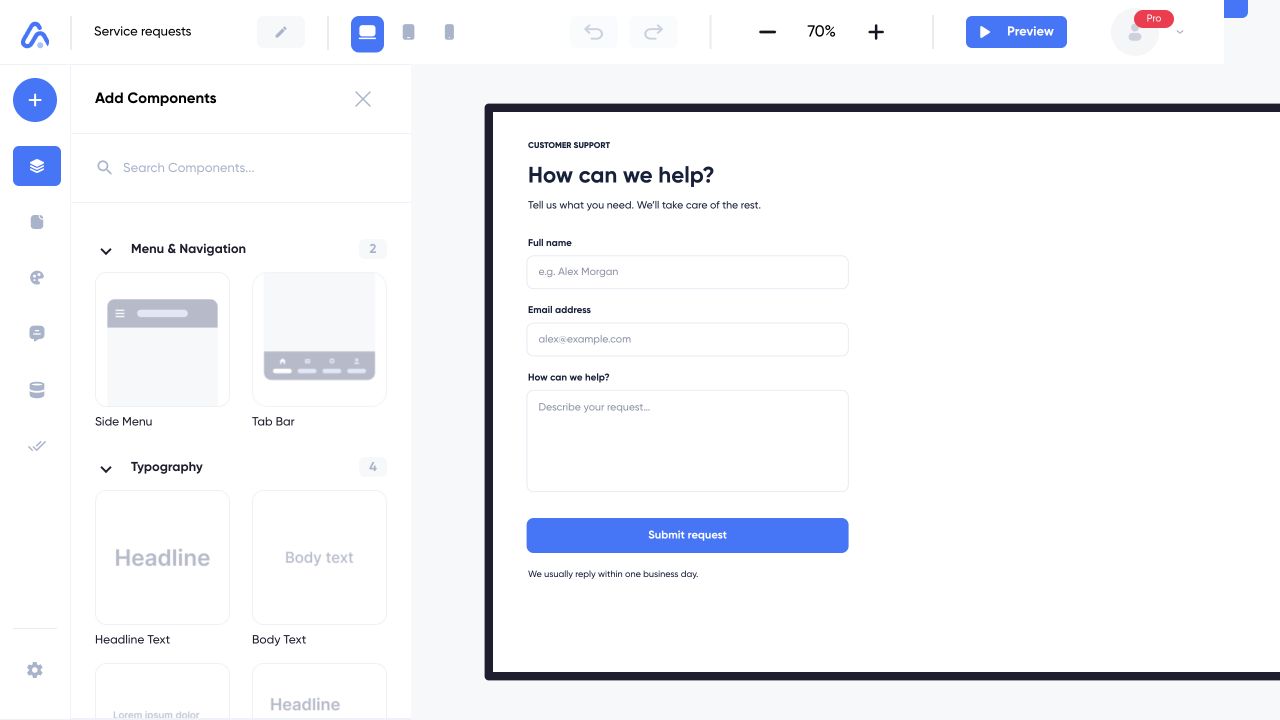
The example app is Service requests. Start with the component library, select an element on the canvas, then check its behavior in Preview.
Web interface captured on 5 Nov 2026 with example content. Choose a numbered note to take a closer look.
Make one complete journey
For a first app, try a form that creates one database record and then opens a confirmation screen. Check the saved record in Backend, test at Desktop, Tablet, and Mobile sizes, then publish the Web App.