Test before publishing
Use Preview to check interactions, then verify the published app in real browsers.
Preview lets you run the app's interactions inside the editor. Use it repeatedly while building a small journey instead of waiting until the app is visually complete.
Run the flow
- Choose a useful starting screen in the editor.
- Select Preview in the top bar.
- Follow the same steps an app user would take.
- Check the real saved record or external result when the flow writes data.
- Choose Edit to return to the editor.
Preview can trigger configured actions. Use sample records and appropriate external test systems when checking writes or payments.
Check the interaction, then return to the editor.
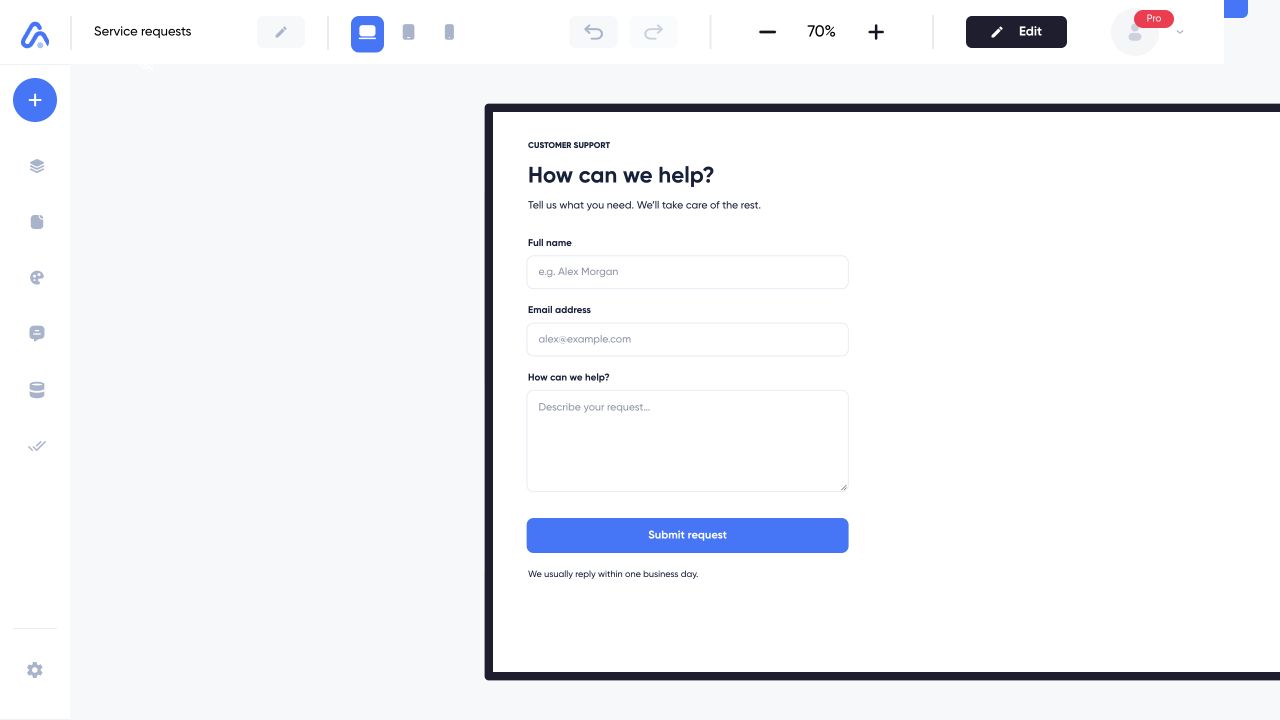
Preview hides the editing panels. Interact with your components and follow the configured flow as an app user would.
Web interface captured on 5 Nov 2026 with example content. Choose a numbered note to take a closer look.
Check the awkward cases
Test empty inputs, long values, an unavailable API, and an empty list. Verify that a failed request does not look like a successful save and that a user can recover without losing unnecessary work.
Switch among Desktop, Tablet, and Mobile views to inspect the layout. After publishing, also test real browser widths and the intended devices.
Know what Preview cannot prove
An editor preview is not the published deployment. It does not establish that a build finished, that external URLs are accessible to visitors, or that a Telegram-only feature works in a normal browser. Test the final published address before sharing it.