Chat, channels & threads
Keep team conversations in context with channels, direct messages, threads, and shared files.
Choose a conversation
Open Chat in the intended workspace. Use Channels for group conversations and Direct messages for conversations with people. Browse channels lists public channels you can open or join.
Use Add channel or New channel to create a channel. Give it a name that describes the work, then review its membership and privacy settings. A private channel is available to invited members.
Send your first message
- Select a channel or direct message from the conversation list.
- Write your message in the composer. Add formatting or an attachment if the message needs it.
- Wait for attachment uploads to finish before sending.
- Choose Send. If the interface reports a failed send, review the connection and retry instead of assuming the message reached the conversation.
Follow the interface
Choose the channel, reply in a thread, and find a message again.
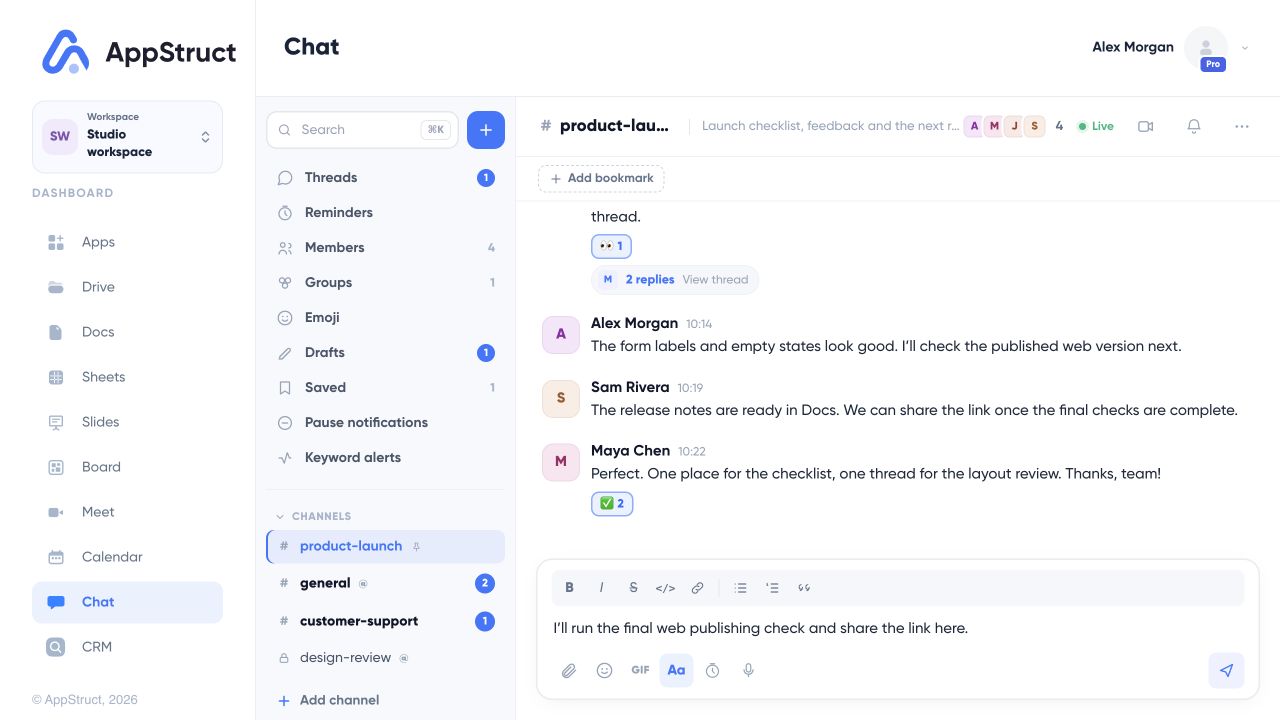
The example channel is product-launch. The text in the composer is a draft; it has not been sent.
Web interface captured on 5 Nov 2026. Workspace names, files, people, and conversations are fictional examples.
Keep replies in context
Use a message’s menu to choose Reply in thread. A thread keeps a detailed discussion attached to the original message. Open Threads to return to followed conversations.
The message menu also provides actions such as editing, forwarding, saving, pinning, or deleting where your access allows them. Saved messages is a personal way to return to useful messages; Pinned messages helps people find information in a channel.
Find messages and files
Use Chat’s search to look for conversations, people, commands, or messages. Open Channel files to find images, videos, audio, and other files shared in the current conversation.
Drafts are kept per conversation. Before switching context, check whether your text is still a draft or has actually been sent.
Meet from a channel
Choose Start a video call in the channel, or Join the call when one is already in progress. These calls use the same camera and microphone checks as Meet.
Archiving and permanently deleting a channel have different effects. Read the confirmation carefully; permanent deletion removes the channel and its messages.